Generate concept directions.
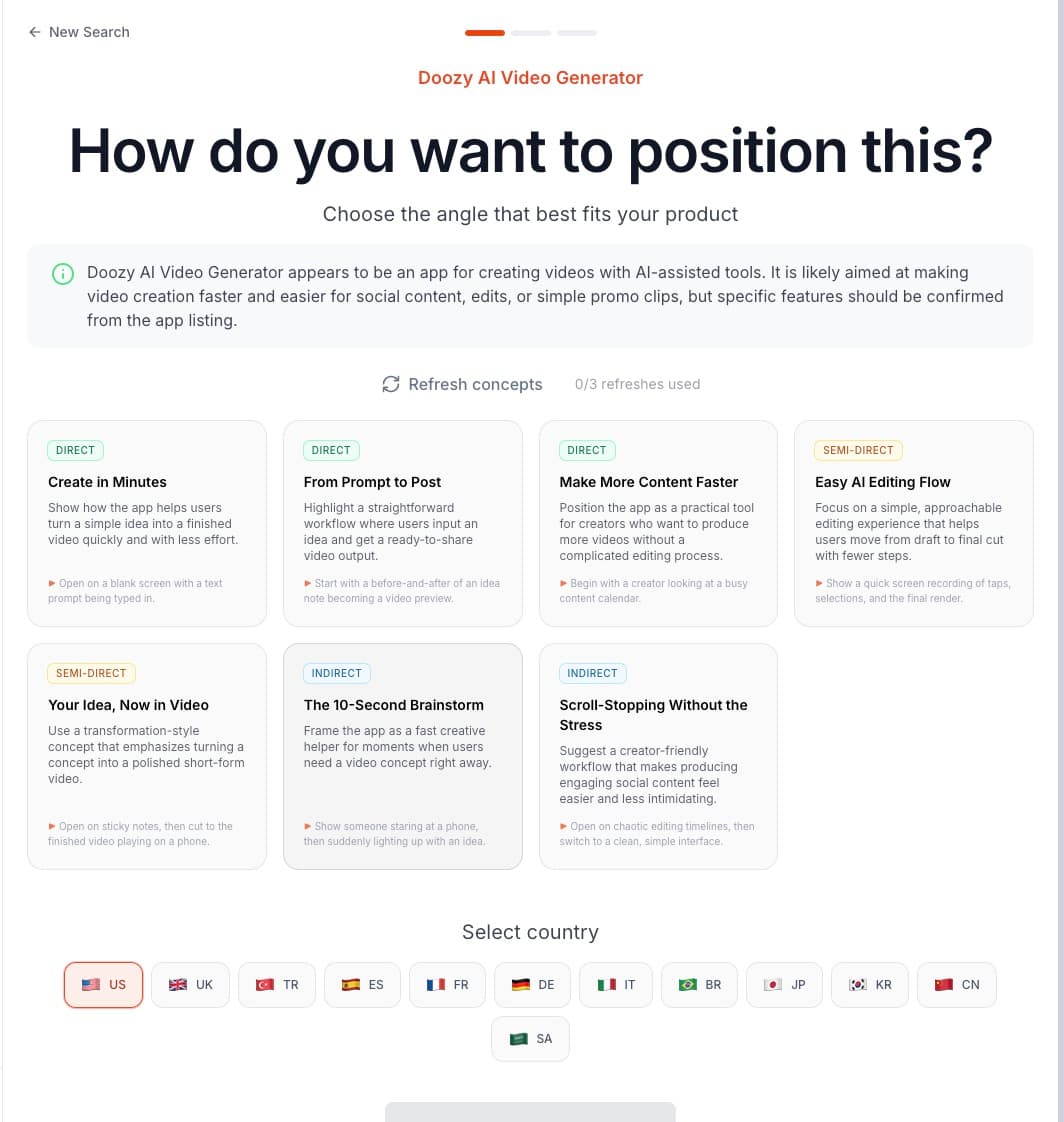
Provide a product link or description. Review seven concepts with a title, explanation, directness type and an opening hook tip.
AI Hook Generator
Generate seven advertising concepts from a product link or description, each with a direction for the first one to three seconds. In your Pantheon workspace, you can also adapt a discovered TikTok hook into a new video and refine its text and visual overlays in conversation.
Start free Explore the workflow ↓A good hook connects an audience problem to a product story. Pantheon separates concept exploration from video alteration: choose a direction first, or begin with a source hook and rebuild its structure around your app.
Choose your angle and market, refine the search, then explore real posts for your next creative direction.
Real product recording and screenshots from Haven Day. Hook scores and view counts describe discovered posts, not measured ad results. Select a screenshot to view it at full size.
Provide a product link or description. Review seven concepts with a title, explanation, directness type and an opening hook tip.
Choose a discovered TikTok hook. Pantheon analyses the person, scene and text, then generates a new video that adapts the structure to your product.
Use a multi-turn conversation to add, move and change text or image overlays. Upload a custom font and render overlay changes separately from the underlying video.
Compare direct, semi-direct and indirect concepts. Each includes guidance for the opening one to three seconds, so you can judge the premise before generating a video.
Generate a variant from a source hook, then derive another variant from that result. Follow a creative direction through successive alternatives.
An overlay adjustment is a separate render job. Update the presentation without treating every text change as a new underlying video generation.
The overlay assistant works across multiple turns. Describe what to add, where it should appear and how it should change instead of rebuilding layers manually.
An illustrative brief to show how the workflow can be used—not a customer result or a performance guarantee.
FIXED CREDIT PRICES
Search and Meta setup operations have fixed prices. Creative generation, editing and localization are billed separately based on usage.
per search
per worldwide search
From a product link or description, Pantheon produces seven ad concepts, each with a title, a description, a concept type (direct, semi-direct or indirect) and a hook hint describing exactly what happens in the first one to three seconds. Concepts can be regenerated up to three times per session.
Yes — by recreating it, not copying it. Pantheon analyzes the source video's person, scene and on-screen text, adapts the source structure, and produces a new video adapted to your app. Variants can be branched from other variants, so one strong hook becomes a family of tests.
Yes. An AI overlay editor adds, moves and edits text and image layers through conversation, and you can upload your own font. Overlay rendering is a separate, low-cost step, so restyling a hook does not re-run the full generation.
The Hook Generator works from TikTok hooks found in Pantheon's discovery tool and focuses on the opening seconds. Ad Clone rebuilds a complete competitor or reference ad — every scene, voice, text and CTA — around your app. Both feed the same editing and deployment pipeline.
COMPARE YOUR OPTIONS
Start with your app. Review the work. Decide what comes next.
Start free ↗