Choose a starting point that fits.
Browse trending templates by category, subcategory and narrative style, or bring a reference. Your app’s name, description, logo and screenshots give the creative a product-specific foundation.
AI Video Ad Generator
Create multi-scene video ads using your app’s story, a trending template or a creative reference. Pantheon brings scenes, characters, text, voice, music and a call to action into an editable composition. Refine the parts you want to change, then download vertical and square versions together.
Start free Explore the workflow ↓The point is not simply to produce a video. An app ad needs a clear promise, a believable product demonstration and a useful next step. Start from an idea or creative reference, inspect the result, and refine the parts that matter before making additional versions.
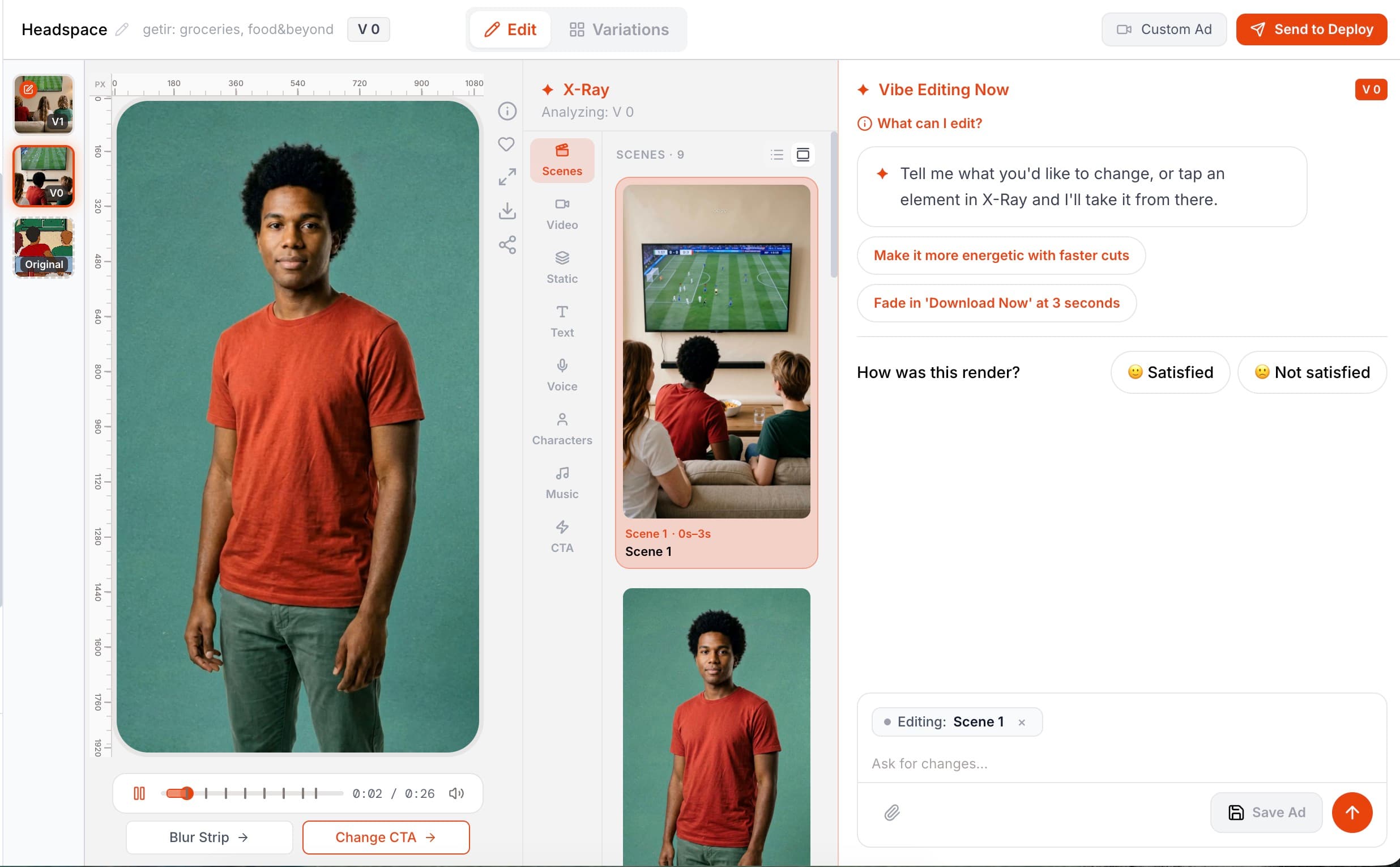
Explore real ad outputs, then look inside the video, image, text, voice, character and music layers in X-Ray.
Real product recordings and screenshots from different app projects. Select a screenshot to view it at full size.
Browse trending templates by category, subcategory and narrative style, or bring a reference. Your app’s name, description, logo and screenshots give the creative a product-specific foundation.
Inspect the opening, the product story and the ending. Refine scenes, characters, captions, voice and music with a prompt. Keep app screens and product statements accurate to the experience people will actually get.
Once the core concept is ready, move into variations or localization. Keep a clear distinction between creating a new concept and changing a specific element of an existing one.
Preview templates, search by title and save favorites. Category and narrative filters help you choose a structure suited to your product rather than start from a blank page.
Use X-Ray to inspect scenes, video, images, text, voices, characters, music and CTA. See where an element appears, select it and direct your next edit at that specific part.
Get 9:16 and 1:1 outputs in a single ZIP. Square conversion can use bars, blurred edges or a center crop, so you can review how the creative fits each format.
For an uploaded reference, Pantheon estimates a low, expected and high render cost. It reserves the high estimate and reconciles it against actual usage when the job completes.
Illustrative brief for a language-learning app. This is an example of creative direction, not a generated customer ad.
A complete multi-scene vertical video ad, not a single clip: scenes, generated video and image assets, on-screen text, a voiceover, characters, background music and a call-to-action, composed as editable layers. Because the output is layered, individual elements can be targeted afterwards; affected assets are regenerated as needed and the updated composition is rendered.
Seedance and Kling for video, Nano Banana and Flux for images, ElevenLabs for voice (including voice cloning and voice design), ACE-Step for music, and OmniHuman for lip-synced talking heads; the final composition is rendered with Remotion. Pantheon routes each step to the model suited to it rather than relying on one generator.
No. Pantheon's Trending Templates library is filterable by category, subcategory and archetype — the narrative pattern of the ad — with a preview, popularity counts and the credit cost of each template shown before you commit. The template's structure is refilled with your app's name, description, logo and screenshots.
Every ad is produced in both 9:16 and 1:1. The square version is built with black bars, blurred sides or a center crop, and both files download together as one zip or deploy to Meta as a single placement-customized ad.
COMPARE YOUR OPTIONS
Start with your app. Review the work. Decide what comes next.
Start free ↗