Competitor Ad Intelligence

Find your real competitors. See what they are advertising.

Start with your app’s store link. Pantheon discovers direct and similar competitors, then brings their active Meta ads into a creative library. Compare relevance, store rank, messages and time in market—and turn the references you save into new ads for your own app.

Start free Explore the workflow ↓
FROM REFERENCE TO DECISION

Know who to study before deciding what to make.

A folder of saved ads is only the starting point. The useful question is why a particular message could matter to your audience. Compare ads from relevant apps, separate the opening hook from the product promise, and write down the idea you want to test before producing a new creative.

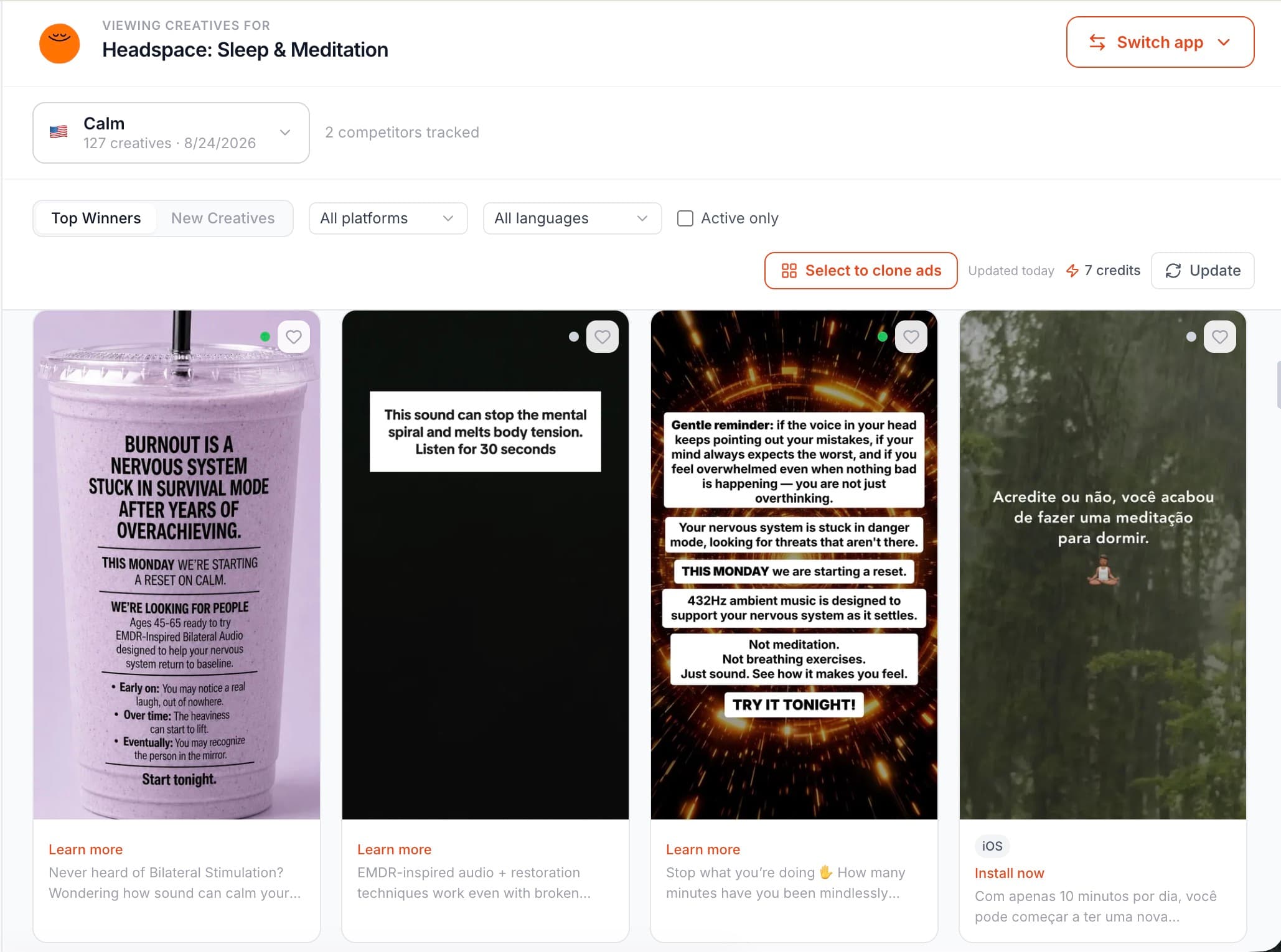
Pantheon competitor creative library with ad previews and creative filters
Inside Pantheon: a competitor creative library. Public creative signals are not verified competitor campaign results.
AD INTELLIGENCE IN ACTION

Know the market. Find your next creative direction.

Explore real competitor research, browse their ads, and turn a reference into your next starting point.

Start with your target market.

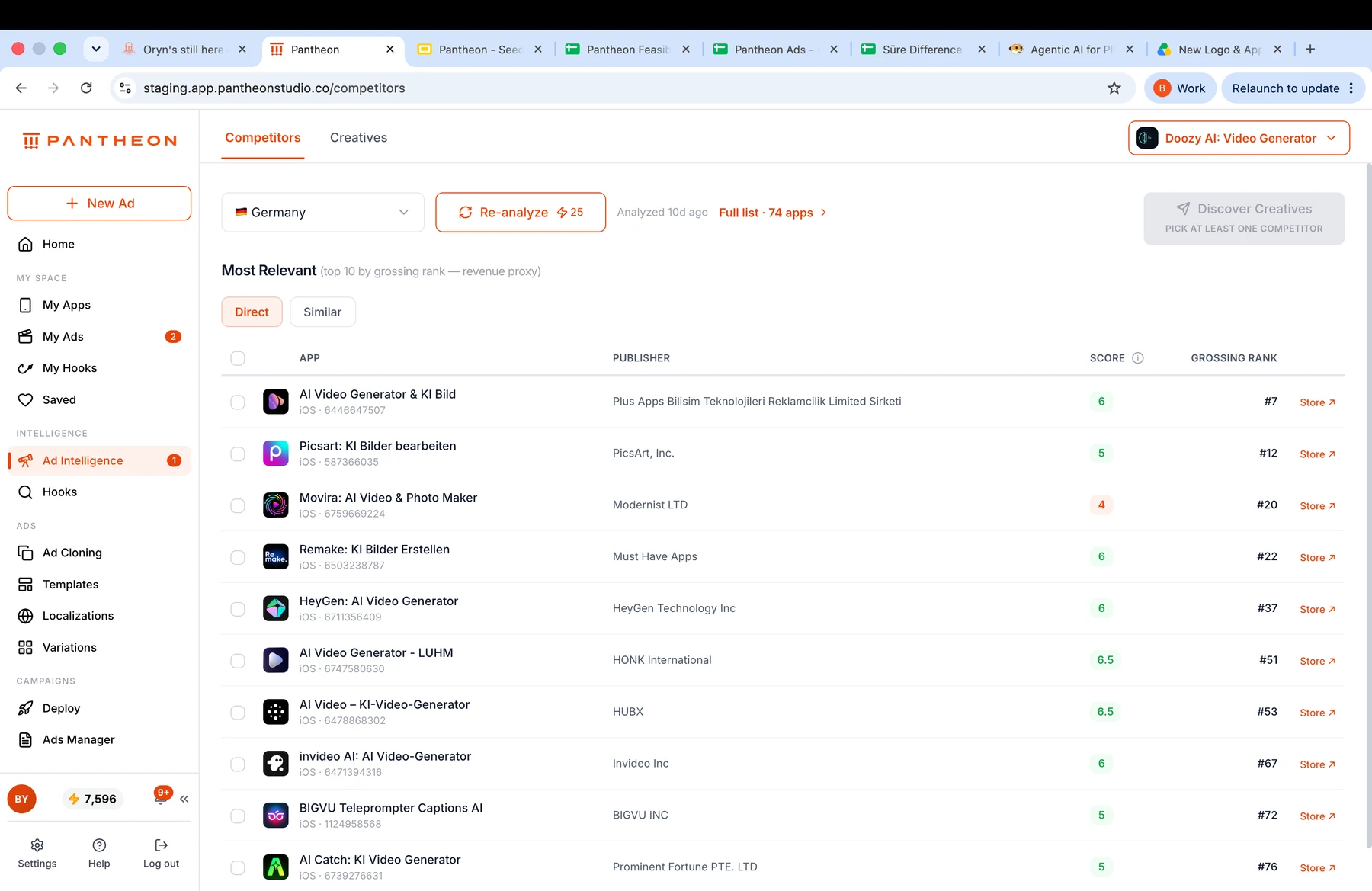
Explore relevant competitors for your app in Germany, with publisher details, scores and store links.

Explore relevant competitors for your app in Germany, with publisher details, scores and store links.

Real product screenshots. Select a screenshot to view it at full size.

YOUR WORKFLOW

Make each step count.

01

Discover direct and similar competitors.

Paste your store link and choose your market. AppTweak-powered discovery brings back direct and similar apps, with a relevance score and grossing rank. A highly relevant app may be unranked: similarity and store position answer different questions.

02

See the ads behind the app.

Open a competitor’s Meta Ad Library creatives. Review videos, images and carousels alongside their copy, call to action, destination, platforms and time active. Follow the original Ad Library link when you want to inspect the source.

03

Turn a reference into a testable idea.

Choose the pattern you want to explore and adapt it to your own app. Carry the reference into Ad Create & Clone, then review the generated scenes, copy and product claims before launching.

MORE CONTROL, FROM START TO FINISH

Built for the whole creative job.

A more useful competitor shortlist.

Direct and similar views separate close alternatives from adjacent apps. Relevance scores help you judge product fit; grossing rank provides store context without pretending to reveal revenue.

Creative context, in one place.

Read the headline, body copy and CTA alongside the creative itself. Check active status, dates and publishing platforms before deciding whether the reference fits your next test.

A library you can refine.

Save favorites, search for apps manually and exclude incorrectly matched pages. Keep your research focused on the businesses and messages that matter to your app.

From discovery to a new ad.

Send a competitor creative into Ad Clone in one click. Pantheon rebuilds the narrative around your app so the research can become an editable concept.

A PRACTICAL EXAMPLE

What to take from a fitness-app ad.

An illustrative research brief—not a customer result or a claim about a competitor’s performance.

Opening hook
A short workout for people who cannot make time for the gym.
Product proof
Show how a user picks a routine in your actual app, rather than borrowing the competitor’s footage.
Test hypothesis
Compare the time-saving opening with a routine-building opening while keeping the app demonstration consistent.

FIXED CREDIT PRICES

Know the cost before you start.

Search and Meta setup operations have fixed prices. Creative generation, editing and localization are billed separately based on usage.

Intelligence

Competitor Search
25 credits

per search

Creative Search
25 credits

per search

QUESTIONS, ANSWERED

Competitor Ad Intelligence: the details.

How do I find out which ads a competitor app is running on Meta?

Pantheon resolves a competitor app’s Facebook page and retrieves creatives available through Meta Ad Library. Review active status, launch date, time active, publishing platforms, CTA, copy and creative assets, with a link to the original entry. A long-running ad can be worth investigating, but does not establish spend, conversions or profitability. Historical availability depends on the source; this is not a complete archive of every past commercial ad.

How does Pantheon decide who my competitors are?

You paste your App Store or Google Play link; Pantheon runs a store-data analysis (AppTweak-backed) for your app's store, OS and country and returns competitors in two lists — direct and similar — each with its grossing rank and a 0–10 relevance score. The two signals are shown side by side on purpose: the highest-grossing app in your category is often not the one most similar to yours.

Can I go from a competitor's ad straight to making my own version?

Yes. A creative found in Competitor Ad Intelligence can be sent to Ad Clone in one click, where its structure is rebuilt around your app. Review the new product story, claims and assets before using the result.

Does Pantheon show competitor ads for apps, or for any brand?

Pantheon is built for mobile apps. Competitor discovery starts from an app-store listing, and the ad library lookup resolves the app's Facebook page automatically. Manual app search and page exclusion are available for cases where the automatic match is wrong.
PUT IT INTO PRACTICE

Plan your next test.

Blog · Benchmarks

Mobile App Marketing Benchmarks 2026: The Numbers Before and After the Install ↗

CPI, paid/organic ratio, retention, trial-to-paid and revenue per install by category — and what creative-matched onboarding does to install-to-subscription.

COMPARE YOUR OPTIONS

See where Pantheon fits.

Bring your next creative idea to life.

Start with your app. Review the work. Decide what comes next.

Start free ↗